IDEMIA · Access control and time and attendance
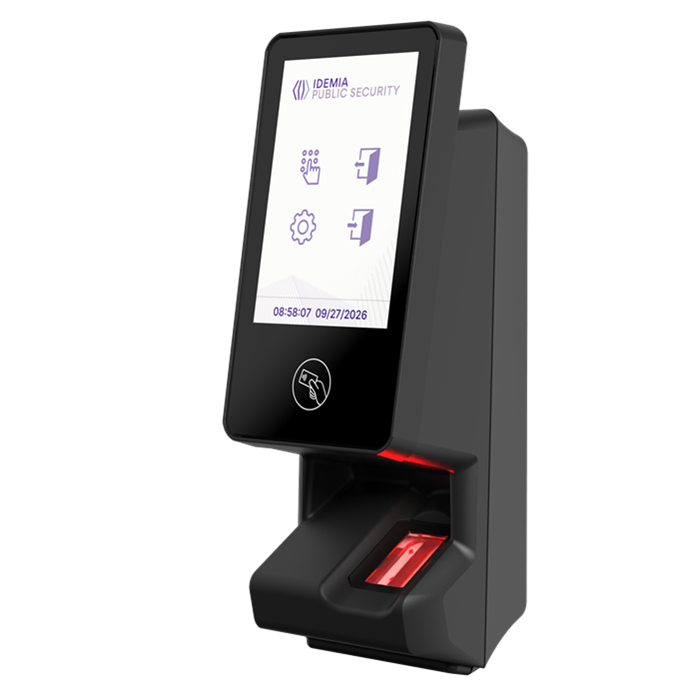
SigmaTouch Pro
Fingerprint, card and PIN access at one terminal.
Use SigmaTouch Pro where staff need touchscreen instructions or clock-ins at the reader.
IDEMIA · Access control and time and attendance
Fingerprint, card and PIN access at one terminal.
Use SigmaTouch Pro where staff need touchscreen instructions or clock-ins at the reader.
Fingerprint, card and PIN
Configure credential options according to the access policy.
3.5-inch IPS touchscreen
Show prompts and results on the terminal.
Time and attendance
Use programmable function keys, employee notifications and job codes where required.
Office entrances Use a PIN or on-screen instructions where the access policy requires them.
Shift-based sites Check how clock-ins and job codes will reach the attendance software.
Mobile credentials Confirm the mobile badge platform and licence before ordering.
OSDP and Wiegand. Confirm controller integration and administration with MorphoManager.
Confirm card formats and any HID mobile credential licence. Manufacturer references: 293816153 (standard) and 293818730 (HID configuration).
Check wiring, power and mounting in the datasheet. Validate the attendance workflow before setting up clock-in rules.
Compare SigmaTouch Go for doors that need fingerprint or card access and LED feedback.
Add SigmaTouch Pro to your quote list. Include your controller, credential formats and any PIN or attendance requirements.

 MorphoWave XP2